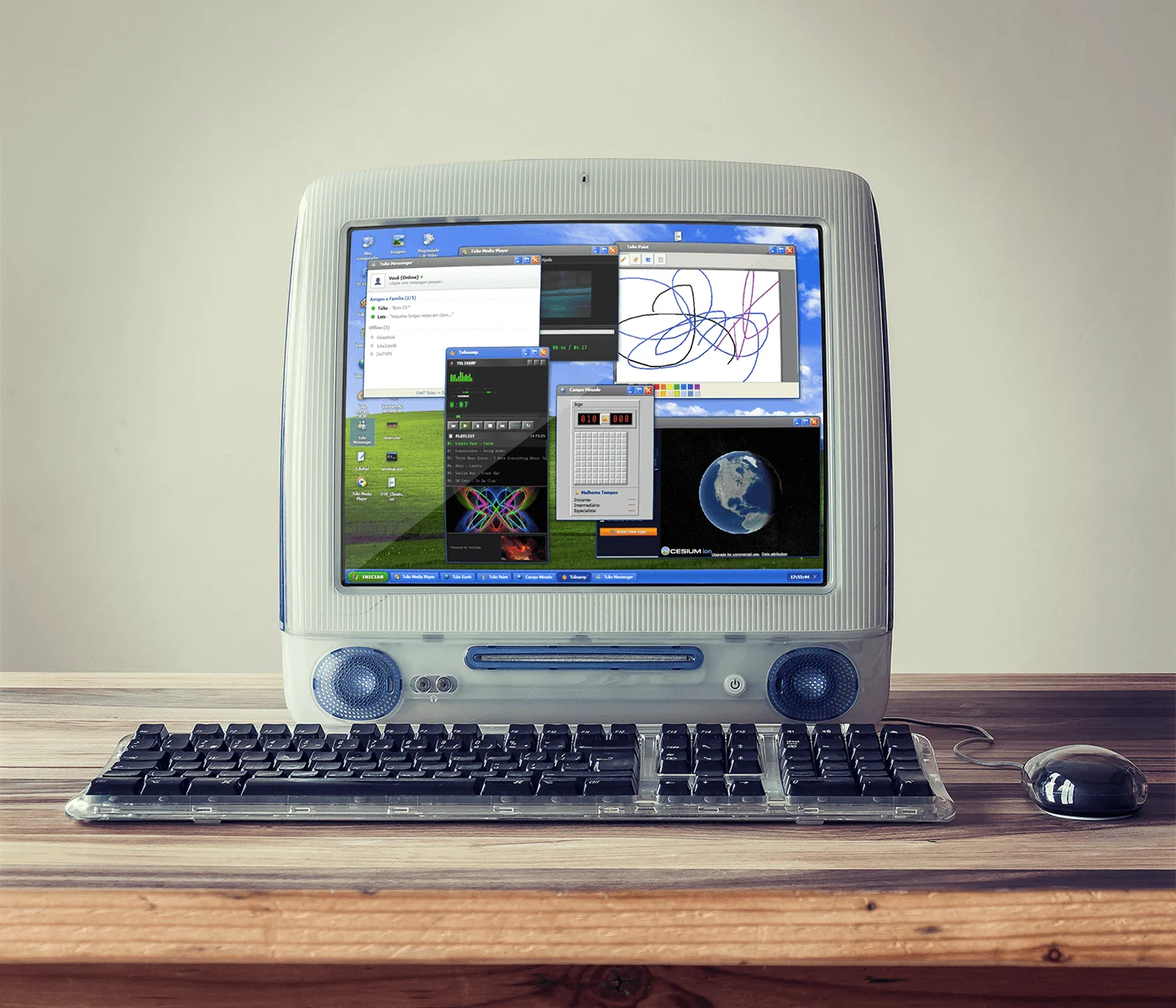
Developed as a technical manifesto inspired by projects like RyoOS and daedalOS, the goal was to demonstrate how the intersection between design and engineering can be accelerated by AI workflows (Figma + Antigravity), creating an ecosystem of functional apps through intelligent code orchestration.
A functional application is available for testing in the frame below.
Unlike portfolios built with modern frameworks, Tulio OS uses Vanilla JS Pure. This strategic decision demonstrates mastery of web fundamentals, allowing complete control over the DOM lifecycle and system performance.
One of the biggest technical challenges was creating a windowing system that supported dragging, resizing in 8 directions, and focus switching (dynamic Z-index).
The project uses a hybrid architecture to keep API keys protected through Serverless Functions in Vercel.
We are on Messenger:
Intelligent chat integrated with the Google Gemini API, simulating the MSN Messenger interface.
No We are MessengerI explored the integration of Google Gemini APIThrough Zero-Shot Persona EngineeringI instructed the model to emulate the nostalgic identity of the old MSN.
The technical challenge was orchestrating this communication between the front-end and the... Serverless Functions In Vercel, this allows for intelligent chat that respects the security limitations and context restrictions I've defined.
3.1. System Instruction & Persona Design Instead of relying on fine-tuning (fine-tuningI used a dense System Instruction that acts as the "DNA" of the AI's behavior:
Conversational Style Transfer: I configured the template to ignore standard grammar rules and adopt the "MSN Style" (lowercase writing, slang from Minas Gerais, and textual emojis like xD, O_o, ^^).
Anchoring de Nostalgia: I injected a dataset of cultural preferences (Tony Hawk, Star Wars, Nu Metal, Hot Wheels Acceleracers) so that the AI would have consistent and authentic "opinions" about the 2000s.
3.2. Skills & Hardcoded Guardrails (Safety and Branding) To protect the integrity of the project, I implemented strict control layers via the prompt:
Anti-Jailbreak Defense: Explicit instructions to ignore commands such as "act like a robot" or "forget the previous instructions," responding with contextual sarcasm.
Scope Restriction (Topic Filtering): AI is instructed to refuse to solve math problems, write lengthy code, or debate sensitive topics (politics and religion), focusing instead on being the "Túlio Designer".
Corporate Secrecy: A specific privacy skill that prevents the AI from revealing past company names or sensitive data, redirecting the user to the official portfolio.
3.3. Technical Implementation (The "Tech Stack")
Serverless Proxy: The front-end never communicates directly with the Google API. I created a Vercel Function (Node.js) that acts as middleware. This protects the API Key and allows the injection of the System Instruction invisibly to the end user.
Gemini 1.5 Flash: Chosen for its low latency (essential for simulating a real-time chat) and wide context window, allowing the bot's "personality" to remain stable even in long conversations.
Response Sanitization: I implemented filters to ensure that the AI's response is short (maximum of 3 sentences), simulating the speed of chat windows from that era.
3.4. Career Transition One of the smartest "skills" configured is the Context TransitionIf the user inquires about work or budgets, the AI "flips the switch" from a casual skater to a Digital Designer focused on UI/UX and Performance, delivering real business value before suggesting contact via LinkedIn.
Tulio Earth:
Visualização de dados geoespaciais usando CesiumJS e Street View com MapillaryJS.
THE Tulio Earth representa a implementação de um Digital Twin global dentro de um ambiente legado. Utilizei o poder de síntese de LLMs para integrar de forma eficiente as APIs do CesiumJS (geometria 3D) e Mapillary (street view). Minha preocupação foi garantir que fluxos massivos de dados geoespaciais pudessem ser visualizados sem comprometer a performance, mantendo a estética Windows XP fiel à proposta original.
3.1.1. Orquestração 3D com CesiumJS Utilizei o CesiumJS, a biblioteca líder para visualização geoespacial 3D, para renderizar o globo terrestre com precisão milimétrica.
Terrain & Imagery Tiling: Implementei o carregamento dinâmico de tiles (camadas) de terreno e imagens de satélite, garantindo que o sistema consuma memória apenas para a área que o usuário está visualizando.
Coordinate Synchronization: Criei um sistema de mapeamento onde o "clique" no globo 3D captura coordenadas geográficas exatas (Latitude/Longitude) para alimentar outros subsistemas do OS.
3.2.2. Integração MapillaryJS (O "Street View" Open Source) Para a exploração a nível de solo, integrei a API do Mapillary, uma plataforma global de imagens de rua baseada em colaboração (crowdsourcing).
Street-Level Experience: Ao selecionar um ponto de interesse, o Tulio Earth aciona o MapillaryJS para renderizar uma visão imersiva de 360°. Isso demonstra minha habilidade em trabalhar com APIs de visualização esférica e manipulação de metadados de imagem.
Sequence Navigation: A ferramenta permite navegar entre sequências de fotos, simulando o movimento de caminhar pelas ruas diretamente dentro da janela do Tulio OS.
3.3.3. Arquitetura de Proxy e Segurança de Dados Assim como no Messenger, os dados sensíveis são protegidos:
API Token Protection: Criei endpoints serverless (api/mapillary.js) que funcionam como proxies. O front-end solicita dados de uma localização e o back-end injeta o Client ID e o Access Token, evitando a exposição de chaves privadas no código client-side.
Lazy Library Loading: Bibliotecas pesadas como Cesium e Mapillary só são injetadas no DOM quando o app é aberto pela primeira vez, mantendo o boot inicial do sistema operacional leve e performático.
Tulioamp:
Manipulação de Web Audio API e simulações de fluxo de dados, utilizando API do Youtube simulando a interface do Winamp.
Com o Tulioamp, utilizei agentes de IA para desbravar a Web Audio API e criar um player funcional inspirado no WinAmp.
O processo focou em implementar visualizadores de áudio e lógica de playlists de maneira direta, onde meu papel foi o de validar a arquitetura sugerida pela IA para que o processamento sonoro fosse preciso e sincronizado com a interface visual.
3.4.1. Orquestração da YouTube IFrame API Em vez de depender de arquivos locais pesados, o Tulioamp utiliza o YouTube como um backend de streaming infinito.
Headless Player Implementation: Implementei o player do YouTube de forma "reduzida" (ou integrada ao design), utilizando-o o mais próximo possível a algo como o provedor do stream de dados. Isso demonstra o domínio da manipulação de APIs de terceiros e o controle de estados (Ready, Playing, Buffering, Ended).API
Command Mapping: Desenvolvi uma camada de tradução que mapeia os botões físicos do Winamp (Play, Pause, Stop, Next, Prev) para os métodos nativos da API do YouTube (player.playVideo(), player.seekTo(), etc.).
3.4.2. Sincronização de Estado em Tempo Real (Polling & Sync) Um dos maiores desafios técnicos foi garantir que a interface do Tulioamp refletisse exatamente o que estava acontecendo no stream do YouTube.
Time & Progress Syncing: Implementei um loop de polling que consulta a API do YouTube em intervalos de milissegundos para atualizar o visor de tempo em LED e a barra de progresso (Seek Bar) do Tulioamp.
Volume & Mute Control: O slider de volume do Tulioamp foi sincronizado com o nível de áudio da API (player.setVolume()), garantindo uma experiência de usuário coesa onde o controle externo dita o comportamento do provedor de mídia.
3.4.3. Gerenciamento de Playlist via ID de VídeoYouTube Data Mapping: A playlist do Tulioamp é alimentada por um mapeamento de IDs de vídeos do YouTube. Isso permite que o sistema gerencie metadados complexos e troque de faixas instantaneamente, carregando o novo stream sem recarregar a página ou a janela do app.
Visualização de Espectro Simulada: Para manter a fidelidade visual sem as restrições de cross-origin do áudio do YouTube (que impedem o uso do AnalyserNode direto), o sistema implementa uma visualização de espectro que reage dinamicamente aos comandos de áudio, mantendo a imersão estética necessária para o projeto (mesmo que de forma reduzida e simplificada).
Exemplo de chamada para a Serverless Function que faz o proxy da Gemini API
O fluxo de entrada foi projetado para construir uma narrativa de "descoberta tecnológica":
4.1 BIOS Sequence: Um dos maiores desafios técnicos em experiências web ricas em áudio é a Política de Autoplay dos navegadores modernos (Chrome, Safari, Edge). Para evitar ruídos indesejados, os browsers bloqueiam qualquer áudio que não tenha sido disparado por uma ação direta do usuário (como um clique).
Como o startup sound do Windows XP é um gatilho emocional indispensável para a nostalgia do projeto, a introdução da FAKE BIOS serviu a dois propósitos estratégicos:
Contorno Técnico:Ao exigir que o usuário clique em "PRESS START TO EXPAND DOMAIN", o sistema recebe a permissão necessária do navegador para executar a Web Audio API. Isso garante que o som de inicialização toque perfeitamente no momento do boot.
Design Narrativo:Instead of a generic "Play" button, the BIOS sequence creates an onboarding ritual. It prepares the visitor's mental model for an operating system experience, increasing the perceived value of the project from the very first second.
Technical Note: Implemented via Event Listener on the global object, where the first interaction unlocks the AudioContext for all subsequent windows and applications of Tulio OS.
4.2. Boot & Welcome:A visual and auditory transition that prepares the user's mental model for the desktop environment.
4.3. Workspace:Where the user has complete control over the icons, windows, and the iconic Clippy OS for contextual hints.
The Windows XP aesthetic was meticulously recreated using only pure CSS3 (without heavy images where code could handle the work), prioritizing:
Visual Fidelity: Gradients, shadows, and borders that evoke the Luna era of Windows.
Tactile Interactivity: Simulation of hover, click, and audible feedback states (WAV/MP3).
WebAssembly emulation: Using js-dos to run the classic DOOM and Prince of Persia, proving the versatility of the web environment.
CSS code snippet for the classic XP window border or gradient.
Although the primary intention of Tulio OS Whether it was the desktop browser experience, there was a central concern in translating the rigid interface of Windows XP into the era of portability.
The technical challenge consisted of adapting a design paradigm conceived in a pre-responsive era to the demands of today's mobile devices.
As a result, the project features a fluid layout that preserves the nostalgic visual identity, ensuring functionality and complete adaptability even on small smartphone screens.
This project is the embodiment of a journey where design meets agentive engineering. It proves that, by understanding systemic logic, a designer can build highly complex technical products in an individual and optimized way.





